I personally havent really used emacs for organizing, but I really like it for bash coding and writing software documenation in orgmode. I am even starting to get a little bit comfortable at writing my .emacs file but at some point I will have to do a lot of reorganizing and updating and I kind of dont want to do it (I still use .emacs and not emacs.d/init.el and all keybindings still use the legacy global-set-key command).
Apart from the work I am putting into it it is really great, because when I actually get to do stuff I can do so with great efficency. I am even starting to miss my emacs keybinds when not using emacs (especially ctrl-k for killing from your cursor position to the end of the line ctrl-a for jumping to the beginning of a line and ctrl-e for jumping to the end of a line). At this point when I am writing stuff in emacs (as example working on a bash script) I at maximum use my mouse for scrolling.
Fuck, I really did turn into the meme (and I am not even using it for longer than 4-5 months at maximum)___
Huh, ‘emacs’ is a weird way to spell nano
Does nano even have a vim mode?
(especially ctrl-k for killing from your cursor position to the end of the line ctrl-a for jumping to the beginning of a line and ctrl-e for jumping to the end of a line)
I haven’t tried emacs but in any other text editor for these things I’d do:
- shift+end, del
- home
- end
do you have any more complex examples where emacs excels?
any other text editor
Can’t wait 'til you try vi
D0
dd
🤣🤣🤣
org-roam
Page starts with two buttons “Discuss with LLM” and “Sunmarize with LLM”
Can’t say the creator leaves a good first impression with me…
It’s a random blog post.
A random blog post that offers to help you “discuss” with a text generator or have a generator produce a text that hopefully contains the key points, which you’ll have no way of checking without reading it yourself 🤷♂️
If you want to offer your readers the opportunity for discussion, have them discuss with humans that can actually offer critical thought instead of critically-sounding word combinations. If you want to offer a summary, provide a qualified one yourself that’ll actually reflect the content rather than a randomly generated text biased by the content.
Yay, welcome to the team.
PS: Are you on !emacs@programming.dev already? Maybe with new people it will have more activity.
Excuse me while I get really mad at you for not using Vim even though it doesn’t effect me in anyway.
Jokes aside, I’ve gone the route of just using an extension in VS code to give me the Vim key bindings. I can’t go back to non-modal text editors the muscle memory is too strong. I really should play around with emacs in “evil mode” at some point. Maybe I could get the best of both worlds then.
Edit: Vince -> Vim, Vince is a terrible text editor he doesn’t even understand my keystrokes when I type at him.
I am even starting to miss my emacs keybinds when not using emacs (especially ctrl-k for killing from your cursor position to the end of the line ctrl-a for jumping to the beginning of a line and ctrl-e for jumping to the end of a line)
A number of software packages permit use of basic emacs keybindings.
It’s the default in bash, which uses readline. If someone is a vi user, they can enable vi keystrokes in software that uses readline with
editing-mode viin their ~/.inputrc.For GTK-based apps, looking on my system:
GTK 1: in ~/.gtkrc:
gtk-key-theme-name = "Emacs"GTK 2: in ~/.gtkrc-2.0:
gtk-key-theme-name = "Emacs"GTK 3: in ~/.config/gtk-3.0/settings.ini
gtk-key-theme-name="Emacs"GTK 4 apparently can’t do this.
Note that this can collide with other keybindings that a given GTK app has assigned to it. I moved the standard Firefox modifier key from Control to Alt to reduce the impact of that on my system. That was a little obnoxious to get worked into muscle memory, but I did ultimately manage it.
Damn, didnt know you could do that. Will definitely look into it.
If you’re specifically wanting to fiddle the Firefox keybinding the way I have (which may be too much effort for some people to deal with re-learning), the setting is:
-
Go change the GTK setting for the appropriate version of GTK. On my Debian trixie system, Firefox is using GTK 3:
  $ apt depends firefox|grep gtk

  WARNING: apt does not have a stable CLI interface. Use with caution in scripts.

  Depends: libgtk-3-0t64 (>= 3.13.7)
  $
I don’t know whether it will change to GTK 4 anytime soon.
-
Go to
about:configin the Firefox URL bar. -
Set
ui.key.menuAccessKeyto 0. Normally, IIRC — it’s been many years that I’ve had this set, so I don’t even really remember the original behavior for certain — Firefox uses Alt in sorta the same way Windows does, to open menus. I don’t like that, and this disables that functionality entirely to free up Alt. -
Set
ui.key.accelKeyto 18. This makes the now-free Alt act like Control does as regards Firefox keyboard shortcuts. -
I also have
ui.key.contentAccessset to 0. It’s been many years since I’ve set this, but…let’s see. goes to look That disables the contentAccess key, prevents webpages from grabbing Shift-Alt-key sequences, which can also collide. Like, in the Lemmy HTML textarea that I’m currently writing this in, I can hit Shift-Alt-B and Shift-Alt-F to move the cursor forward and backward by a word while selecting text, the way I could in emacs (or, in emacs parlance, move point while extending the region).
The problem is that now you’ve got Firefox, where things like “Alt-A” will select all text, and if you use other GUI apps, other apps, which may be using “Control-A” for that, so you gotta train your muscles to deal with it. I haven’t thought about it in many years, as it’s automatic now, but I remember it being super-obnoxious when I started.
For me, it was worth it, because I use emacs all the time and Firefox all the time, and rarely use other graphical apps, so it reduced the amount of switching. But…depends on what someone’s particular situation is, whether that makes sense for them.
EDIT: Had accidently written
ui.key.contentAccesstwice. Corrected the first instance to beui.key.menuAccessKey.Will definitely look into it. Currently Emacs and Firefox are about my main applications I use (except spyder, which is a python IDE)
Well, cool. Hope it was helpful, then.
I’ll also mention one other point, if you’re a big emacs and Firefox user. Won’t solve the issue for URL bars or other non-webpage text, but if you do a fair bit of writing in HTML textareas in webpages, like on Lemmy instances or something, you can hand that off to (actual) emacs.
-
Install the
edit-serverpackage for emacs (M-x list-packages, wait for the emacs package manager to load the list, go toedit-server, hit “i” to flag for install and “x” to execute, orM-x package-installand just type out “edit-server”). -
In an emacs instance run
M-x edit-server-start(or set it up to always run automatically at emacs startup but I run multiple emacs instances). -
Grab the Edit with Emacs Firefox addon. Install.
Now, by default all textareas will have a little blue button at the bottom reading “edit”. Click it, and your textarea will open up in emacs.
C-c C-cto commit changes back to the textarea (OrC-x C-c, if you’re exiting that instance of emacs). You can also right-click on the textarea and choose “Edit with Emacs”.- Install the
edit-serverpackage for emacs (M-x list-packages, wait for the emacs package manager to load the list, go toedit-server, hit “i” to flag for install and “x” to execute, orM-x package-installand just type out “edit-server”).
Jokes on you, I already mapped
M-x package-installtoS-p i.But that also sounds interesting. Will definitely try it out (and if its just for writing Lemmy comments)
- Install the
-
-
People who know what emacs is is the same demographic as people who love talking about what software they use
I will also info dump this to people who dont know what emacs is.
I had a college professor that I worked for who was basically the Emacs Enthusiast. So I gave it a try, learned about a half dozen commands and never really moved past that. Later, I was told to give vi a try, so I did and had basically the same experience. Built-in discoverability is/was non-existent for them and I never had a real need to pick up any more or spend hours reading man pages to figure them out. Time past, I went through a few different phases of GUI text editors/IDEs but could always pull out just enough vi or emacs commands when I needed. I did see my colleagues and friends who were all in on vim/emacs with 1000 line configs and thought they looked pretty cool, but I just didn’t have the time or inclination when I could be doing other things.
Then in the last year I needed to go all in on a text mode editor for a variety of reasons. I looked around, gave Helix a try, and loved it from the beginning. My few vi commands worked, there is actual discoverability built in, and the select->action grammar makes way more sense to me than the others I’ve tried.
Helix is not as extremely customizable or configurable as vi or emacs (yet, plugin system coming soon™ ) but it has a good default out-of-the-box configuration, enough configuration options for what I want, good lsp support, and discoverability.
I love Helix, and the default set of keybinds is great, although obviously customising them gets you closer to your ideal.
I used to live in emacs, back when emacs stood-for “Eight Megs ( RAM ) & Continuous Swapping”.
( the 386-486 days )
Morass-of-capability.
Then, after being fought-off by Vim a couple times, I read, in “The DESIGN of Everyday Things”, that humankind has a mental-defect which causes us to NOT change-levels, when we NEED to have changed-levels.
People who speak louder, when the hearer doesn’t even know the language, are doing this, e.g.
& after that, I encountered a good explanation of Vim’s modality, & found out about vimtutor…
& tried it, again…
& then understood that by forcing my self to keep using Vim ( I’m autistic/woodenheaded, so forgetting what mode I’m in is much more frequent than it would be for neurotypicals ) applies-force to help break my unconscious-woodenness-of-mind, making my mind more levels-agile.
Through the years, it has worked.
I’ve not used Helix, which apparently is a modern improvement/replacement for Vim ( without much of the damn cruft ),
but modal editors do help make one’s mind more levels-agile, & THAT is immensely worthwhile: it is competitive-advantage that few others invest-in!
No, I’m not recommending Vim: I’m recommending modal-editors.
Find the one which works rightest for you, & let it keep bashing your unconscious-mind’s stuckness default-habit, & eventually you’ll be cornered by fewer bugs, be broken to failure less often, etc.
Morass-of-capability felt nice, but it was solving the wrong problem.
Modal-editing corrects one’s human mental-defect of not-changing-levels, to some extent, & that’s like being ambushed by a gang, except that one’s got what Crocodile Dundee called “a knife” on one…
( :
_ /\ _
huh
ctrl x ctrl s go brrrrrrrrrrrrrrrrrrrrrrrrrrr
me use nano too, emacs vim scary.
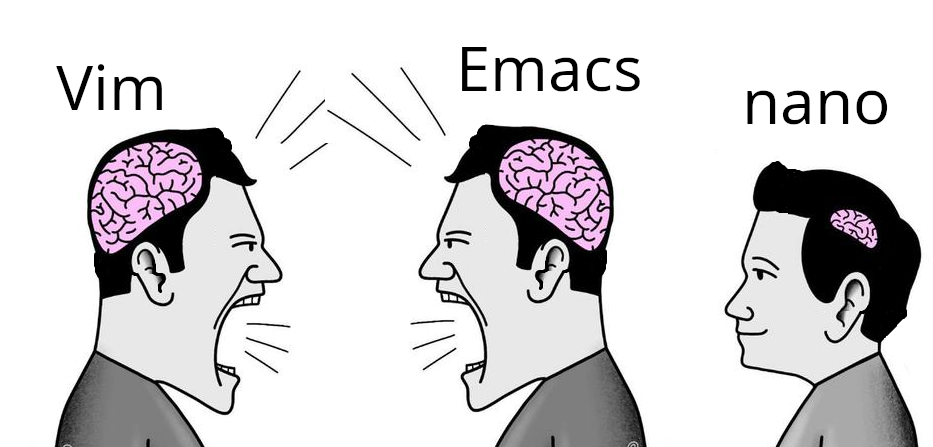
Vim and emacs are really worth it when you do a lot of writing and editing (whether it be code or text). If you only occasionally edit config files nano is completely fine. However I do recommend to learn stuff like exiting and saving in vim because no matter what, about every single distro has some form of vim so you might encounter it in imporant scenarios and then you know your way around.
I have, in the past, recommended, if you use Unix systems in a technical way, knowing at least how to do the following in vi (and I use emacs):
-
Close the program, discarding changes. From vim’s command mode,
: q ! RET. -
Exit writing changes. From vim’s command mode,
: w q RET. -
Move the cursor around. Today, usually you can get by with arrow keys – I haven’t been on a system where one thing or another was dicked up in a way that rendered arrow keys unusable in many years, but from Vim’s command mode, “h”, “j”, “k”, and ""l.
-
Enter insert mode to Insert text. From vim’s command mode, “i”.
-
Exit insert mode. From vim’s insert mode, ESC.
-
Search for text. From vim’s command mode, “/”, the text to search for, and RET.
-
Replace text. From vim’s command mode, “:%s/foo/bar/g” to change all instances of foo to bar in a given file.
If you’ve got that much and you ever find yourself on a system that only has vi available (and it may not be vim), you can at least do the basics.
But the widespread deployment of
nanohas made learning basic vi less important than was once the case. Even very small systems that I’ve run into tend to havenano.Note that busybox, a popular statically-linked shell often used in a rescue-the-horribly-broken-system scenario, does not have nano but does have a minimal “vi”-alike, so you might still want to know vi in that case.
Thats exactly the kind of stuff I meant.
-
Micro is somewhere there too.
It was originally
pico, which IIRC was bundled with thepineemail client (a “tree name” pun offelm, an older email client, whose name came from “ELectronic Mail”; this pun extended to many other Unix email clients, like mulberry and such). I think that “pico” probably stood for something like “PIne COmposer”. Because it was designed to be particularly approachable, listed the basic commands at the bottom of the screen, and pine was installed on a lot of systems, it kind of got adopted as the “Unix notepad for the terminal” — a simple editor that most users could use for lightweight tasks. Then IIRC due to pine predating standard open-source licenses, the nano clone was created to be GPL.searches
https://en.wikipedia.org/wiki/Pico_(text_editor)
Yeah, it’s “pine composer”, it was indeed bundled with pine. And apparently part of the problem was that the license didn’t fully spell out the conditions under which it could be redistributed.
I’m only ever using a command line text editor for changing the odd config file, so for me the benefits of vim or emacs has never outweighed the hassle of figuring them out. So I stick with nano.
So there’s where you live now? In the eMacs?