

241·
12 days agopoop gems
At least they’re pretty.

I like computers, trains, space, radio-related everything and a bunch of other tech related stuff. User of GNU+Linux.
I am also dumb and worthless.
My laptop is ThinkPad L390y running Arch.
I own RTL-SDRv3 and RSP1 clone.
SDF Unix shell username: user224
poop gems
At least they’re pretty.

Shit’s about to get bad.

A fox. It (I don’t know whether male or female) was in a city. It didn’t seem too fearful of people, so I tried following it. When we got to a darker area it sat down, and so did I.

When it got up, I followed it, ending up on volleyball playground. With sand. The fox started running around in it. I noticed it would kick some sand, then jump there.
So I squat down, and threw a handful of sand to the side. This did work. It approached me to arm’s reach, but would spring away at any movement. I accidentally scared it off when the fox circled very closely around me and I turned around - I was worried about getting peed on. Foxes do that a lot.
Some 40 minutes later, I lost it at a construction site.
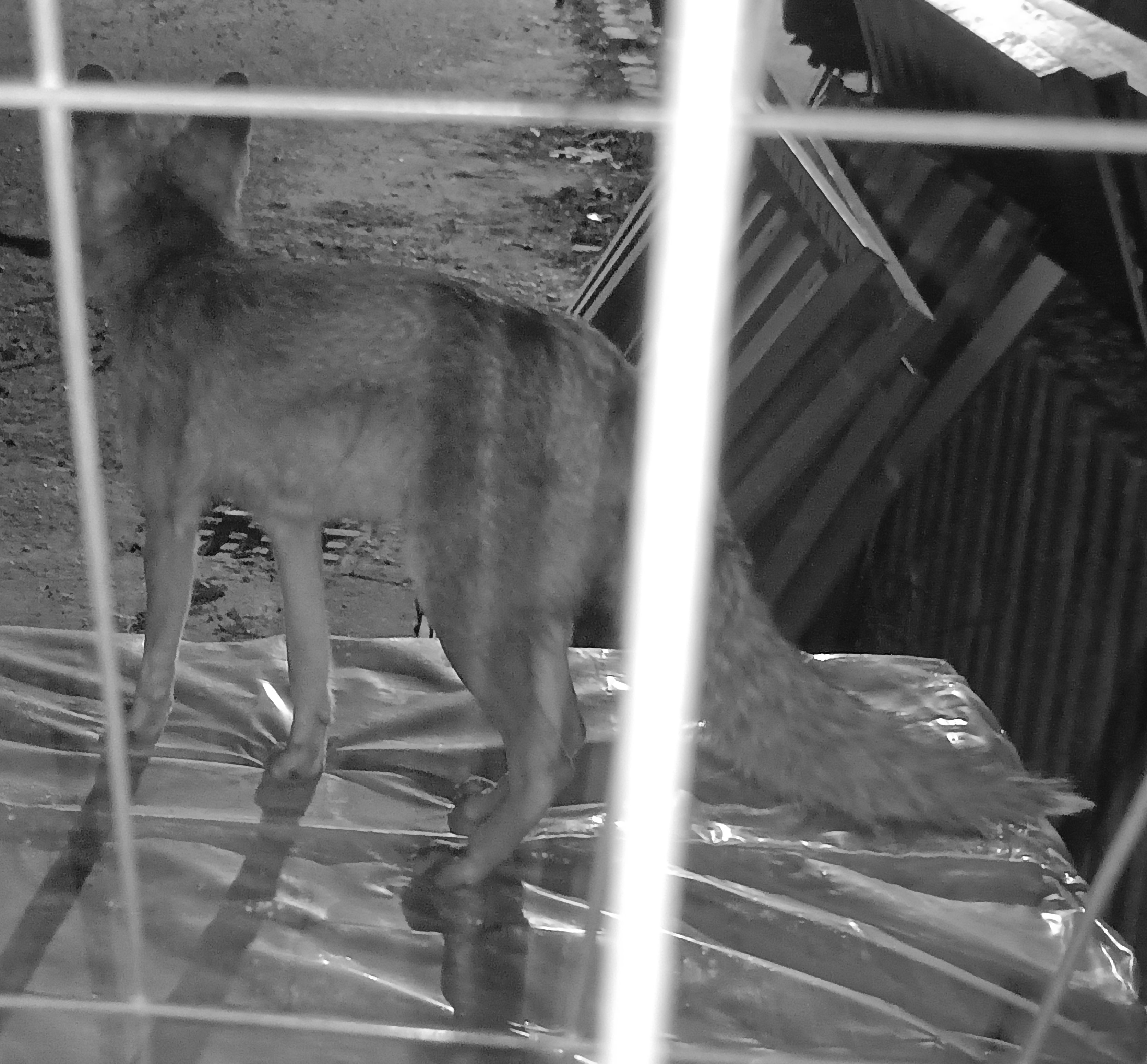
I completely lost the sight of it after I circled around to enter there.
Anyway, not a picture, but I also have some bit of video:
All is B&W because I used IR camera. I don’t know how much of that foxes see, but I hope it’s at least far less than if I used regular flash.
Try it in a (proper) computer. I’ve had a phone complain, but it mounted on Linux. And after whatever magic fsck.fat does, it mounted on phone too.
I also had a SanDisk fail read-only.
Rip’n share sounds like a good phrase for pirate site.
And the you go on to use Termux, and encounter swipe from left to manage sessions.

We’re so cooked

But that bear looks so pettable 🥺

This seems like it’s for sharing same keyboard and mouse between multiple computers. What I am looking for is for the secondary laptop just to act as a monitor. That’s it. It could just be a video stream of a virtual monitor.

Thing 3 spice vnc is built in
Waypipe proxies separate windows, not the whole display. It’s pretty cool. Just looks the same as local programs, but running on a different machine.
What I mean is the mouse cursor isn’t there when I move it over there. Well, isn’t visible. It still interacts with objects.
Same as this person’s issue: https://discuss.kde.org/t/show-cursor-on-virtual-display-kde-connect-krdc/43421
please take a look and tell me what you think
Sorry if it seems like I do, but I in fact do not have a brain.
I just found this tool gets the job done, and that’s it.
I typically just use it in a pretty stupid manual way.
local$ waypipe -c zstd=6 ssh username@IP
remote$ export DISPLAY=:90
remote$ ./xwayland-satellite :90 &
remote$ xfce4-panel
Even the xfce4-panel discovery was an accident.
I was using waypipe before knowing about xwayland-satellite. I wanted to run an X program, so in the same shell I typed vncserver to, well, launch a VNC server. That invoked xfce4-session, BUT since the WAYLAND_DISPLAY was set, XFCE DE attached to waypipe rather than XTigerVNC, launching a full remote desktop over my local one.
And out of that, xfce4-panel proves pretty useful. I can easily launch other programs using GUI, and also see widgets on that panel.
Here’s what I mean, if that sounds confusing:
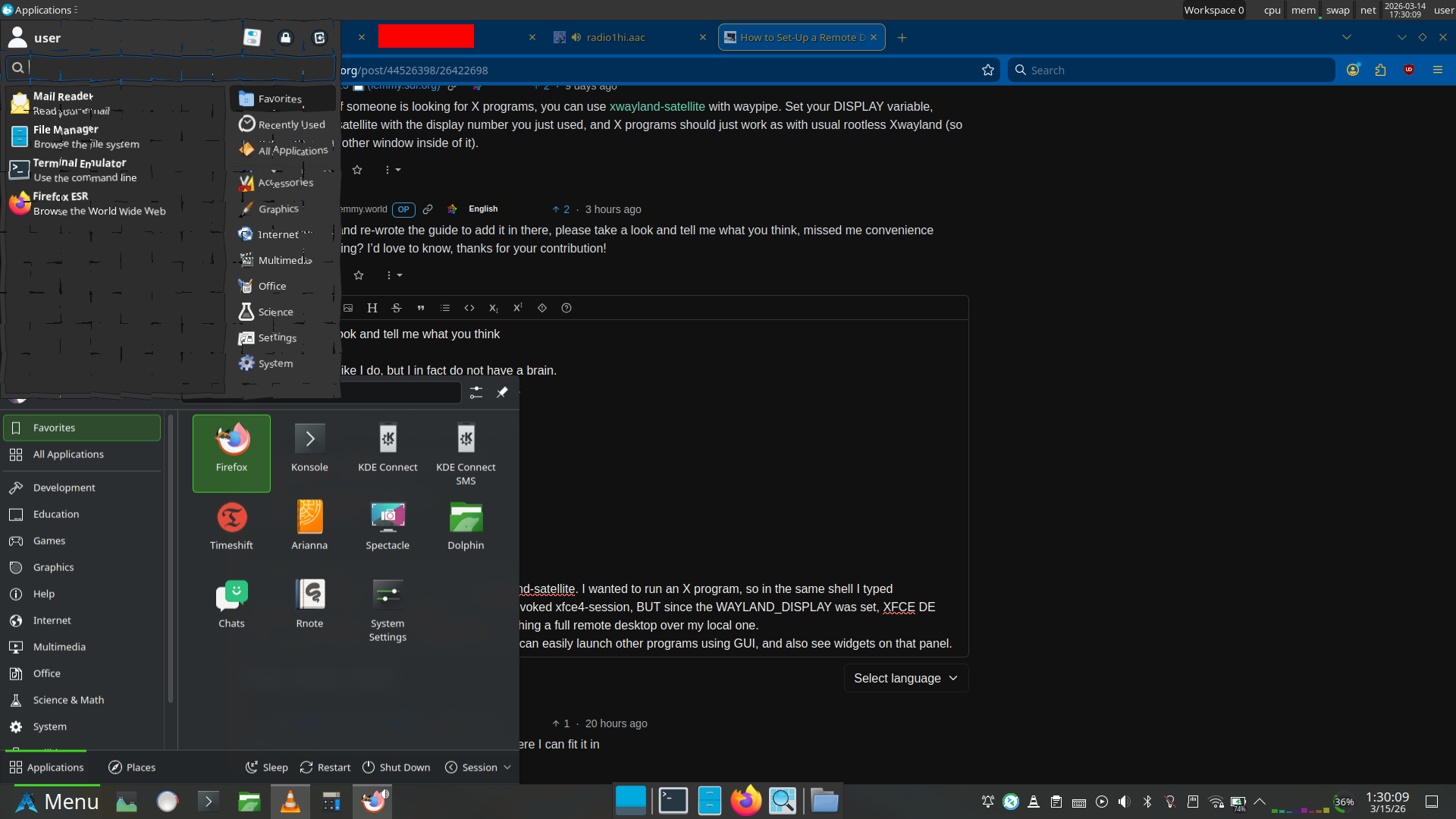
Plasma panel (bottom) is local, XFCE panel (top and middle bottom) are remote.
Right, and you’re probably wondering why that app launcher at the top looks shattered. Well, both can’t be opened at once. If the application launcher goes out of focus, it closes.
But also, I use the shatter effect in KDE Plasma, so it doesn’t go away immediately. This is just as close as I could get with screenshot timing.

Just random cheap one - Schneider Ceod.
Writes smoothly, but I don’t have experience with other pens.
Other than that I just have Stabilo beFab, but I think document ink has done some damage to it now.
Nah, Mallard can do that just fine: https://en.wikipedia.org/wiki/LNER_Class_A4_4468_Mallard#1938_speed_record
Speed record: 126 mph (203 km/h).
RackNerd for my VPSs (3 of them right now)
Mullvad VPN
NextDNS
No, just Germany.
















Hey.
So, it would seem I gave you a solution that’s still more complicated than it needs to be.
You see, I was using Debian at the time I initially played with this, but now I am testing it on Arch. When you check the man pages, you’ll see an interesting option available on Arch.
So…
Waypipe on Debian 13 (latest) is version 0.9.2.
Meanwhile on Arch we have 0.11.0.
There’s an interesting new option,
--xwls.Which means that on Debian you have to:
While on Arch you just
pacman -Sy xwayland-satellite waypipe.Then it works with
waypipe --xwls ssh user@IP program.It seems to have been added in 0.10.6.