

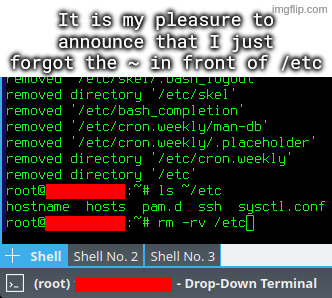
I accidentally untarred archive intended to be extracted in root directory, which among others included some files for /etc directory.
I went on to rm -rv ~/etc, but I quickly typed rm -rv /etc instead, and hit enter, while using a root account.
OOOOOOOOOOOF!!
One trick I use, because I’m SUPER paranoid about this, is to mv things I intend to delete to /tmp, or make /tmp/trash or something.
That way, I can move it back if I have a “WHAT HAVE I DONE!?” moment, or it just deletes itself upon reboot.
Just get a cli trash tool and alias it to rm. Arch wiki
That’s certainly something you can do! I would personally follow the recommendation against aliasing rm though, either just using the trash tool’s auto complete or a different alias altogether.
Reason being as someone mentioned below: You don’t want to give yourself a false sense of security or complacency with such a dangerous command, especially if you use multiple systems.
I liken it to someone starting to handle weapons more carelessly because the one they have at home is “never loaded.” Better safe than sorry.
Lol we should have “rules of rm safety”:
I think this is the best approach. I’ve created a short alias for my trash tool and also aliased
rmto do nothing except print a warning. This way you train yourself to avoid using it. And if I really need it for some reason I can just type\rm.If you want to train yourself even more effectively you can also alias
rmto runslinstead :)Choo-choo!!
Hehe I just thought of a hilariously nefarious prank: alias ls to sl. 😂
Yeah, there’s no need to alias it. Trash-cli comes with its own
trashcommand.Hey that’s a pretty good idea. I’m stealing that.
I’ve read this somewhere too! Where are you quoting it from if I may ask?
But yes I also agree 💯%. rm should always be treated with respect and care by default rather than “customizing the danger away.”
Quoting from Linux Hater’s Handbook, lovely read
EDIT: UNIX Haters, not Linux hater, my bad
LOL nice, I’ll have to check it out. :) Thanks!
… is it the “UNIX-Hater’s Handbook” from 1994 with a parody of “The Scream” on the cover?
Yup, that one. It’s also available here, sans cover - https://web.mit.edu/~simsong/www/ugh.pdf
i always do “read;rm ./file” which gives me a second to confirm and also makes it so i don’t accidentally execute it out of my bash history with control-r
Also stealing this. What an awesome tip
This need’s to be higher in the comments!